You set a limit, tapped "ignore" a week later, deleted Instagram, reinstalled it on a Sunday. Now you want an app blocker for iPhone that actually holds. There are several good ones, and they differ less in what they block than in one question: what does it take to get back in?
A blocker you can open with one tap is a reminder. A blocker that asks for a breath, a device or a page is a habit. This list compares eight options by that question, says who each one suits, and gives prices as listed on the US App Store on 20 October 2026.
Disclosure: ReadFirst is our app. We list it first because this is our site, and we have tried to describe every other app fairly, using only what its App Store page or official site says.
How to choose an app blocker for iPhone
Choose an app blocker by how strict you need it to be and what you want to do instead of scrolling. Ask yourself three questions:
- How do I usually break my own rules? If you tap past limits, you need a stricter way back in. If you mostly open apps on autopilot, a short pause may be enough.
- What do I want more of? Focus at work, sleep, movement or reading. Some blockers turn the way back in into that thing.
- What do I want to pay? The options here range from free to a yearly subscription or a one-time hardware purchase.
Almost all iPhone blockers build on Apple's Screen Time technology, so the blocking itself is similar. The difference is the door.
The best app blockers for iPhone at a glance
| App | How it gets you back in | Best for | Price (US App Store, 20 October 2026) |
|---|---|---|---|
| ReadFirst | Read a page of a printed book, take a live photo | People who want to read more | $39.99/year (3 days free for new subscribers), $7.99/month or $99.99 once |
| Opal | Timed breaks with an intention; Deep Focus, which Opal says can't be bypassed | A polished, strict all-in-one blocker | Free download; Yearly Plan $99.99, Monthly $19.99 |
| one sec | A breathing pause before the app opens | Gentle nudges that break autopilot | Free download; from $6.99/month or $19.99/year |
| ScreenZen | A wait that can grow with each open, plus strict blocks | A strong blocker at no cost | Free; optional tips $5 to $40 |
| Brick | Tap your phone on a physical Brick device | A hard physical barrier | App free; Brick device $59 on getbrick.com |
| Jomo | Rules, open limits, exercises, or time earned with routines | Flexible rules and earning time with habits | Free download; Jomo Plus $5.99/month or $29.99/year |
| Apple Screen Time | Tap to ignore the limit, unless a passcode blocks it | A free baseline, or parents | Built in |
| Forest | Finish a focus session to grow a tree | Students and focused work sessions | Free download; Forest Plus from $5.99/month |
1. ReadFirst: open your apps by reading a page
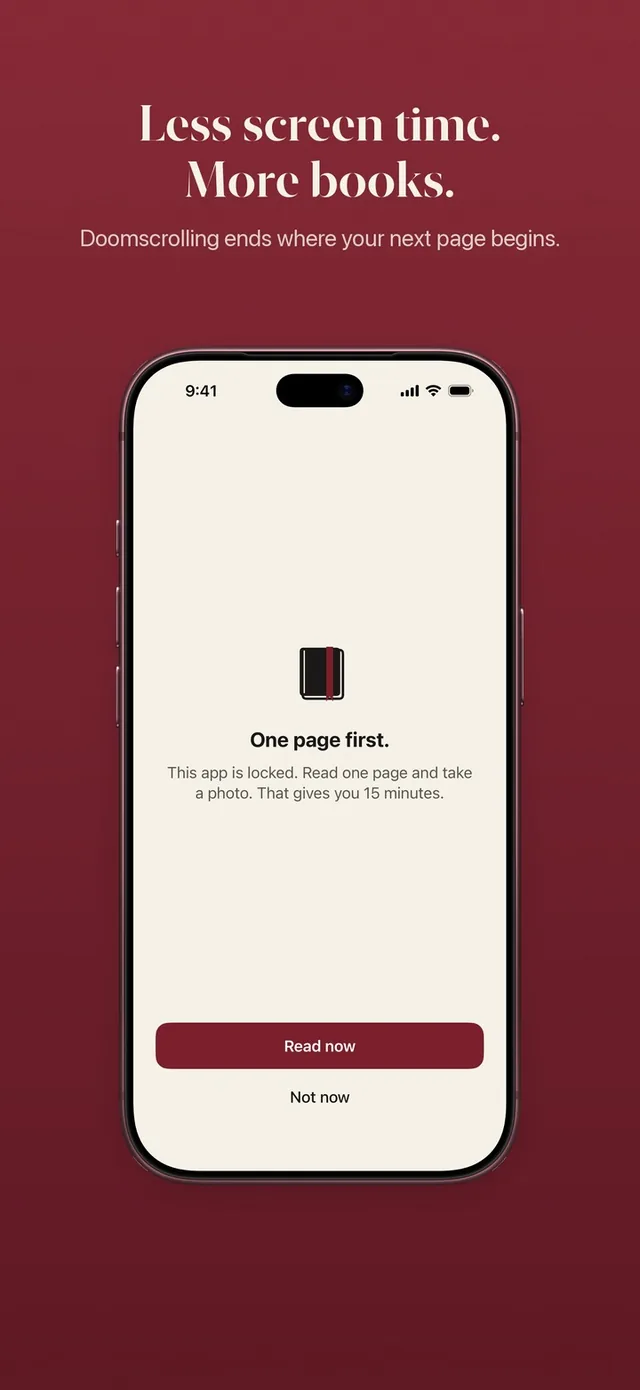
ReadFirst locks the apps and websites you choose, and the way back in is a page of a printed book. When you open a locked app, you see "This page can wait." You read, take a live photo of the last page you read, and the page is checked on your iPhone; the photo is never saved. Your apps then open for the minutes your rule sets, for example one page for 15 minutes, and those minutes only run while you use the locked apps.
Read more than your rule asks and the extra minutes go into a bank for later that day. Every day starts locked at midnight. It also tracks your reading: a bookshelf, a daily page goal, a streak, progress charts, widgets and 60 reading medals. See read to unlock for the full flow.
- Who it suits: Adults who want to scroll less and read more, and who know a one-tap limit won't hold them.
- Who it doesn't suit: E-book readers (it works with printed books only), and people who want schedules that open apps freely during set hours.
- Price: $39.99 a year with 3 days free for new subscribers, $7.99 a month, or $99.99 as a one-time purchase. No free tier. iPhone and iPad, iOS 18 or later.
2. Opal: polished and strict
Opal lets you back in through planned breaks: you pick an app, state an intention and set a timer. It also blocks by schedules and daily limits, and its Deep Focus mode, in Opal's words, "won't let you cancel or bypass at all."
- Who it suits: People who want a polished all-in-one blocker with a hard no-bypass mode and don't mind a premium price.
- Price: Free download with in-app purchases; Yearly Plan $99.99 and Monthly Plan $19.99 among the plans listed.
- Compare: Opal vs ReadFirst and apps like Opal.
3. one sec: a breath before the feed
one sec doesn't block apps outright. In its own words, it "delays access to distracting apps instead of blocking apps completely": a breathing pause runs before the app opens, and it can send you out again after a set time.
- Who it suits: People who mostly open apps on autopilot and want a gentle interruption, not a wall.
- Price: Free download; paid plans from $6.99 a month or $19.99 a year, with a one-time option listed at $99.99.
- Compare: one sec vs ReadFirst.
4. ScreenZen: strong and free
ScreenZen adds a wait before distracting apps open, and the wait can grow with each open. It also offers daily goals, schedules, strict blocks and a way to lock its own settings.
- Who it suits: People who want many friction options without paying.
- Price: Free, supported by optional tips from $5 to $40.
- Compare: ScreenZen vs ReadFirst.
5. Brick: a physical key
Brick pairs the app with a small device. You tap your phone on the Brick to block your chosen apps, and you need the Brick again to unblock them. The maker lists five emergency unbricks for when you really need out.
- Who it suits: People who want a hard physical barrier and prefer paying once for hardware over a subscription.
- Price: The app is a free download with no in-app purchases listed; the Brick device is $59 on getbrick.com.
- Compare: Brick vs ReadFirst.
6. Jomo: rules and earned time
Jomo blocks apps, categories and websites with locks, open limits and a Strict Mode. It can ask for an exercise before unlocking, and its routines let you earn screen time by finishing habits like making your bed or going for a run.
- Who it suits: People who like flexible rules and the idea of earning screen time, at a mid-range price.
- Price: Free download; Jomo Plus $5.99 a month or $29.99 a year.
- Compare: Jomo vs ReadFirst.
7. Apple Screen Time: the free baseline
Screen Time is built into every iPhone. Downtime and App Limits (iOS 26), or Screen Time Schedules and Time Allowances (iOS 27), set when and how long apps can be used. Apple's own guide notes that by default, Screen Time limits can be ignored once reached; a Screen Time passcode with Block at Downtime makes them firmer.
- Who it suits: Anyone who wants a no-install starting point, and parents managing a child's device with a passcode they control.
- Price: Built in, no extra cost.
- Compare: Apple Screen Time vs ReadFirst, and our guide to reducing screen time on iPhone.
8. Forest: grow a tree while you focus
Forest is a focus timer: stay off your phone and a virtual tree grows, leave early and it withers. Its Allow List blocks chosen apps during a session, and Time Guard can block apps on a schedule.
- Who it suits: Students and anyone who likes a visual reward for focused work sessions.
- Price: Free download; Forest Plus from $5.99 a month, with annual plans listed from $32.49.
- Compare: Forest vs ReadFirst.
Which app blocker should you pick?
The best app blocker for iPhone is the one whose way back in you will actually respect. A quick guide:
- You want something free: start with Apple Screen Time, then try ScreenZen.
- You open apps without thinking: one sec or ScreenZen.
- You need a wall you can't talk your way past: Opal's Deep Focus or Brick.
- You like rules and rewards: Jomo, or Forest for study sessions.
- You want the time you win back to become reading: ReadFirst.
Prices and features change often. Check each App Store page before you buy; everything above is as listed on the US App Store on 20 October 2026, unless a price is marked as from the maker's site.
A simple plan to test a blocker
Give any blocker a fair, short trial before you decide.
- Pick your top three apps from the Screen Time report. Block only those.
- Set a rule you can keep on a bad day. Too strict, and you will turn it off by Wednesday.
- Use it for seven days without changing the settings.
- Count the overrides. If you skipped or ignored the block more than a few times, move to a stricter way back in.
- Ask what you did with the time. If the answer is "not much," pick a blocker that turns the way back in into something you want.
That last point is why we built ReadFirst. The minutes you take back from the feed are worth more when they turn into something. With ReadFirst, the way back into your apps is a page you read, apart from a few skips a week you set yourself, and over weeks those pages become finished books.
Frequently asked questions
What is the best app blocker for iPhone?
It depends on how strict you need it to be. ScreenZen and Apple Screen Time are free, one sec adds a gentle pause, Opal and Brick are the strictest, Jomo and Forest add rewards, and ReadFirst opens your apps only after you read a page of a printed book.
Is there a free app blocker for iPhone?
Yes. Apple Screen Time is built into iPhone, and ScreenZen is free with optional tips, as listed on the US App Store on 20 October 2026. Several others are free to download with paid plans.
Which app blocker can't be bypassed?
Opal says its Deep Focus mode won't let you cancel or bypass it, and Brick needs the physical device to unblock, apart from five emergency unbricks. Apple Screen Time can be ignored by default unless a passcode and Block at Downtime are set.
Do app blockers work on iPhone without Screen Time?
Most iPhone app blockers use Apple's Screen Time technology to block apps, so you give them Screen Time permission during setup. ReadFirst does the same and locks only the apps and websites you choose.
Is ReadFirst free?
No. ReadFirst costs $39.99 a year with 3 days free for new subscribers, $7.99 a month, or $99.99 as a one-time purchase, as listed on the US App Store on 20 October 2026.