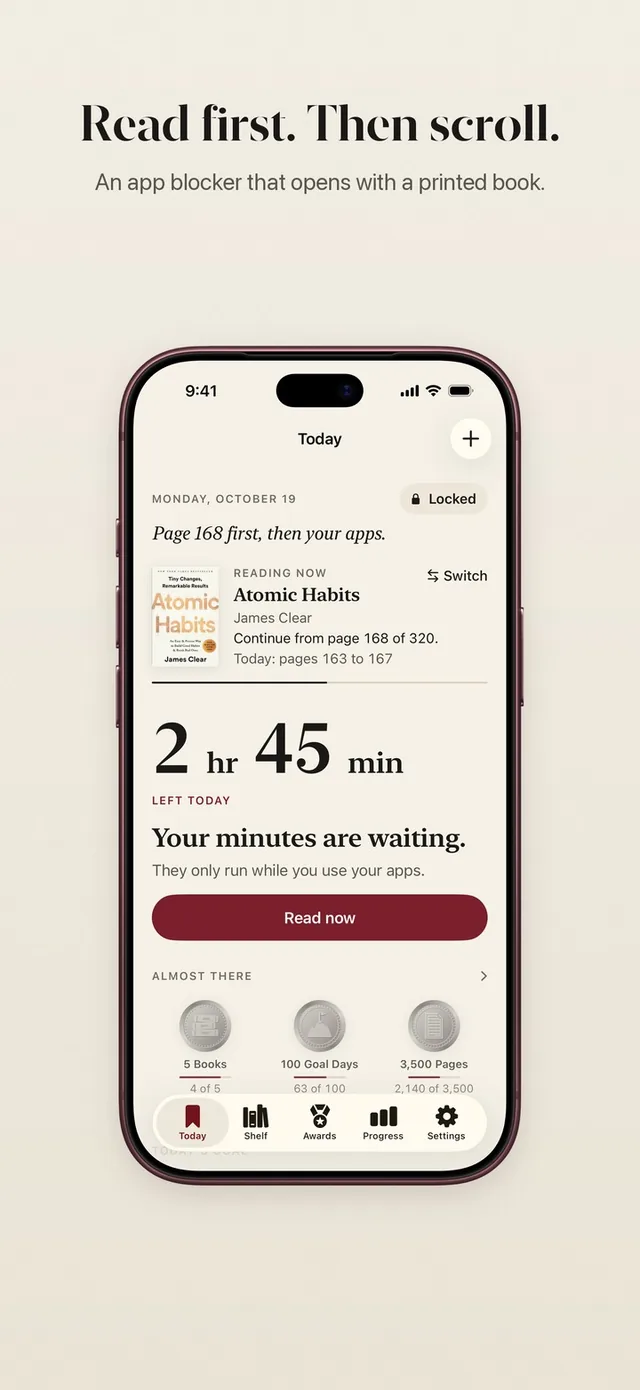
If you are searching for an Opal app alternative, you probably like the idea of blocking apps but want something that fits you better: a lower price, a gentler feel, or a block that leaves you with more than a quiet hour. ReadFirst is one honest answer. It locks the apps you choose, and a page of a printed book opens them again.
We make ReadFirst, so we are not neutral. We checked every fact about Opal on its App Store page and website on 20 October 2026.
What is Opal?
Opal is a screen time app that blocks chosen apps and websites by schedule, daily limit or timer. Its App Store listing is "Opal: Screen Time Control" by Opal OS Corporation, and it adds an Opal Score and focus rewards on top of the blocking.
You can plan blocks across the week, set daily limits that kick in on their own, and take breaks where you pick an app, state an intention and set a timer. For hard days there is Deep Focus, which the store describes as a mode that "won't let you cancel or bypass at all". Opal's website also names a Hard Mode: "No way out. You can't turn Opal off."
Opal is free to download with in-app purchases. As listed on the US App Store on 20 October 2026, the Yearly Plan costs $99.99, the Monthly Plan $19.99 and weekly plans start at $4.99. The App Store lists it for iPhone with iOS 18 or later, and Opal's site says it is available on iPhone, Mac and Android.
Opal vs ReadFirst at a glance
| Opal | ReadFirst | |
|---|---|---|
| What it is | Screen time app with schedules, limits and focus modes | App blocker plus reading tracker |
| How you get back into your apps | Wait for the schedule or limit to end, or take a timed break with an intention | Read a page of a printed book and take a live photo of it |
| Strict mode | Deep Focus and Hard Mode with no bypass | The lock stays until you read; skips are 1 a week by default and can be set to 0 |
| Reading built in | None | Bookshelf, reading clock, goal, streak, medals |
| Printed books | Not part of the app | Required: every unlock is a real page |
| Streaks and goals | Opal Score and focus rewards | Daily page goal, streak with one grace day a month, 60 medals |
| Price (US App Store, 20 Oct 2026) | Yearly $99.99, monthly $19.99, weekly from $4.99 | Yearly $39.99 with 3 days free for new subscribers, monthly $7.99, one-time purchase $99.99 |
| Platforms | iPhone (App Store); site also names Mac and Android | iPhone and iPad, iOS 18 or later |
| Best for | Strict, scheduled blocking across devices | Turning scrolling time into reading time |
Where Opal is a great choice
Opal is a strong pick if you want a polished, strict blocker and you do not mind a premium price. Its schedules suit people whose days have a clear shape: deep work in the morning, no social apps after dinner, a hard stop at bedtime.
Deep Focus and Hard Mode are real strengths. If you know that any way out will be used, a mode with no bypass at all can be exactly what you need. Opal also reaches beyond the iPhone, which matters if your distractions follow you to a computer.
If you want blocks that follow a calendar and a single app to manage them, Opal does that well.
Why readers pick ReadFirst
ReadFirst asks a different question. Instead of "when are you allowed to scroll", it asks "did you read first". The difference shows up in what you have at the end of a month.
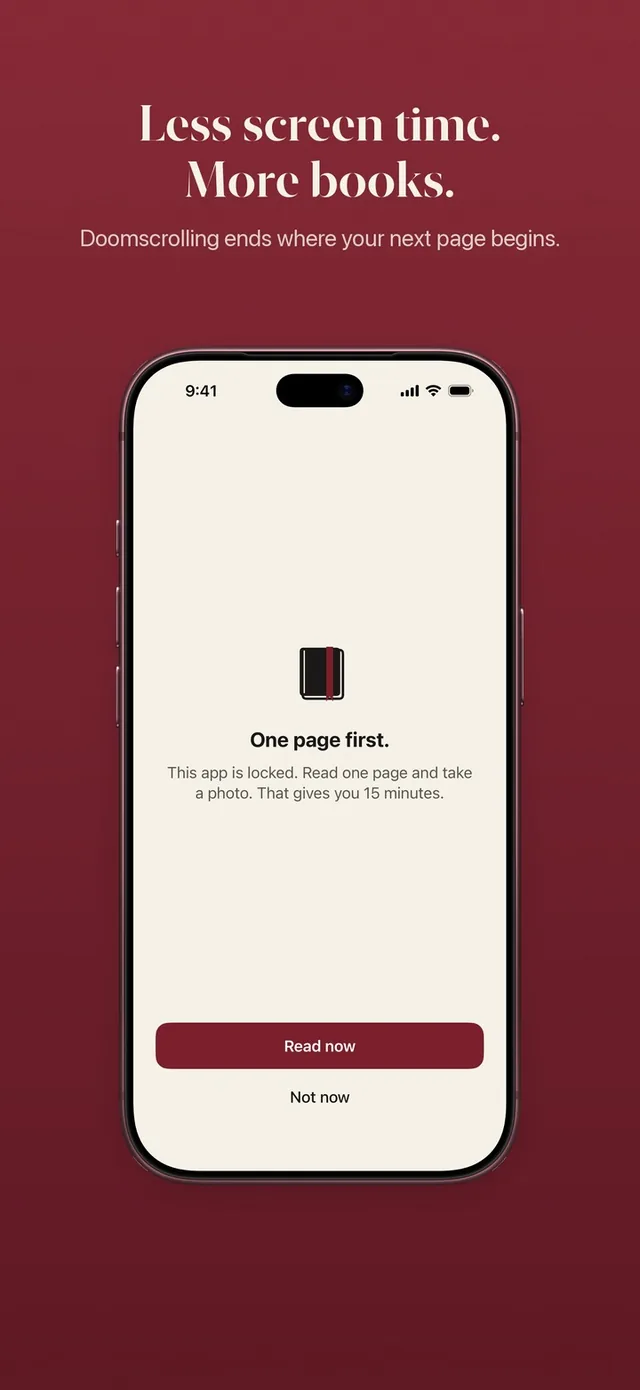
- A page instead of a timer. When you open a locked app, you see "This page can wait." Tap Read now, read your printed book and take a live photo of the last page. Your apps open for the minutes your rule gives. See how read to unlock works.
- Pages become minutes, on your terms. Your rule might be one page for 15 minutes. You can change it any time, and the change applies right away. Minutes only run while you use the locked apps.
- Read ahead, scroll later. Extra pages go into a bank for later that day, up to 5 hours, and one tap opens your apps without a new photo. The bank empties at midnight. More on the read-ahead bank.
- A reading tracker built in. Your bookshelf, a daily page goal, a streak with one grace day a month, 60 reading medals, and widgets for your Home Screen and Lock Screen. Every page you read for an unlock also counts for your book.
- Checked on your iPhone, no account. The page photo is checked on the device and never saved. Screens and pages you already showed do not count. Read how the page photo check works.
There is also the price. ReadFirst's yearly plan is $39.99, less than half of Opal's listed $99.99 Yearly Plan, and there is a one-time purchase if you would rather not subscribe at all.
Is there a free Opal alternative?
ReadFirst is not free, so we will not pretend it is. There is no free tier: you get 3 days free on the yearly plan as a new subscriber, then $39.99 a year, or $7.99 a month, or $99.99 once.
If free is your main requirement, look at ScreenZen, which is free and supported by optional tips, or at Apple Screen Time, which is built into your iPhone. We compare both in our ScreenZen comparison and our page on Apple Screen Time. If you want more options side by side, our round-up of apps like Opal lists eight.
Can you use both?
You can, but most people will not need to. Two blockers guarding the same apps can get confusing, because you never quite know which one is holding the door shut. If you love Opal's work schedules, one option is to let Opal guard your workday and let ReadFirst guard the apps you reach for in the evening. Pick different apps for each so you always know which rule is in charge.
Which one should you choose?
Choose Opal if:
- You want strict schedules and a mode with no way out at all.
- You need blocking on a computer as well as your phone.
- Price matters less to you than a large set of controls.
Choose ReadFirst if:
- You want the time you take back to turn into pages and finished books.
- You like a rule you set yourself, like one page for 15 minutes, more than a timetable.
- You want a lower yearly price or a one-time purchase.
Frequently asked questions
Is ReadFirst a good Opal app alternative?
It is if your goal is to read more while you scroll less. ReadFirst locks the apps you choose and opens them when you read a page of a printed book, where Opal focuses on schedules, limits and strict focus modes.
Is ReadFirst free like Opal's download?
No. ReadFirst has no free tier. New subscribers get 3 days free on the yearly plan, which is $39.99 a year; there is also $7.99 a month or $99.99 as a one-time purchase (US App Store, 20 October 2026).
Is ReadFirst cheaper than Opal?
Opal's Yearly Plan is listed at $99.99 and ReadFirst's yearly plan at $39.99 on the US App Store on 20 October 2026. Monthly, Opal is listed at $19.99 and ReadFirst at $7.99.
Does ReadFirst lock my whole phone?
No. Only the apps, categories and websites you choose are locked. Everything else on your iPhone works as usual.
Does ReadFirst work with Kindle or e-books?
No. ReadFirst works with printed books only, and photos of screens, including e-readers, do not count.