You've thought about it before. Delete everything, put the phone in a drawer, go back to being a person who reads on Sunday mornings. Then Monday comes, you need maps and messages and the bank app, and by Wednesday the feed is back as if nothing happened.
A digital detox doesn't have to be all or nothing to work. This 7-day digital detox challenge is built for people who want to read again. It keeps the phone useful, removes the habits that eat your evenings and puts a book where the scrolling used to be.
What this digital detox is, and what it isn't
This digital detox challenge is a week of small, cumulative changes to how you use your phone, paired with daily reading. It isn't a week offline. You keep calls, messages, maps, music and work. What changes is how easily the endless apps can take your attention.
The idea is simple: every time you would have scrolled, you read a little instead. Not because you force yourself every minute, but because you set things up so the feed asks for a few pages first. By day seven you'll have a different evening, a book in progress and a clear sense of which changes you want to keep.
You need three things to start:
- A printed book you actually want to read.
- A list of the two to five apps that cost you the most time.
- Ten minutes on day one for setup.
Before you start: set up your gate
The most important step in this detox is deciding how your feed apps will open during the week. If they open with one tap, the reflex will win on a tired evening. The detox works much better with a gate that asks for something real.
You have a few options:
- Delete the apps for a week. Strong, but some people simply reinstall them on day two.
- Use Apple Screen Time limits. Built in and free, but by default a limit can be ignored once it's reached. Our page on Apple Screen Time and ReadFirst compares the two.
- Make the apps open only after you read. This turns every reach for the feed into a few pages of your book.
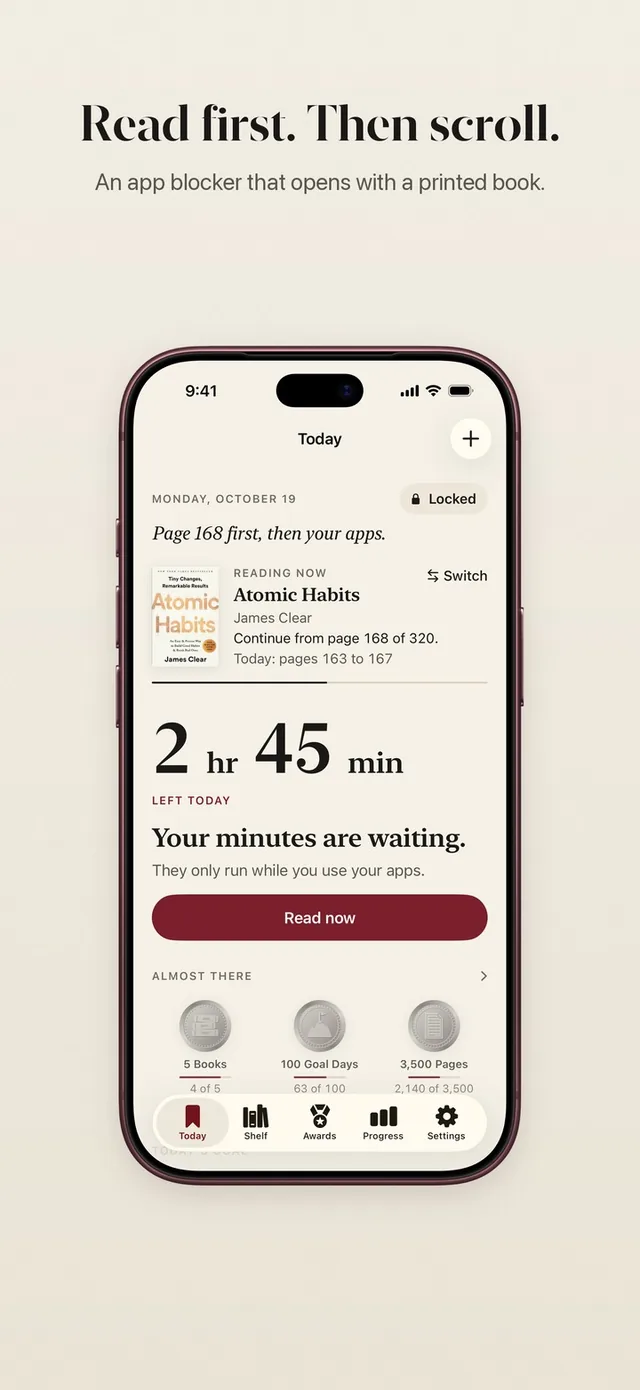
ReadFirst does the last one. You choose the apps (and websites) to lock with Apple Screen Time. When you tap one, you see "This page can wait." To open your apps by reading, you read a page or a few of your printed book, then take a live photo of the last page you read. The page is checked on your iPhone, and the photo is never saved.
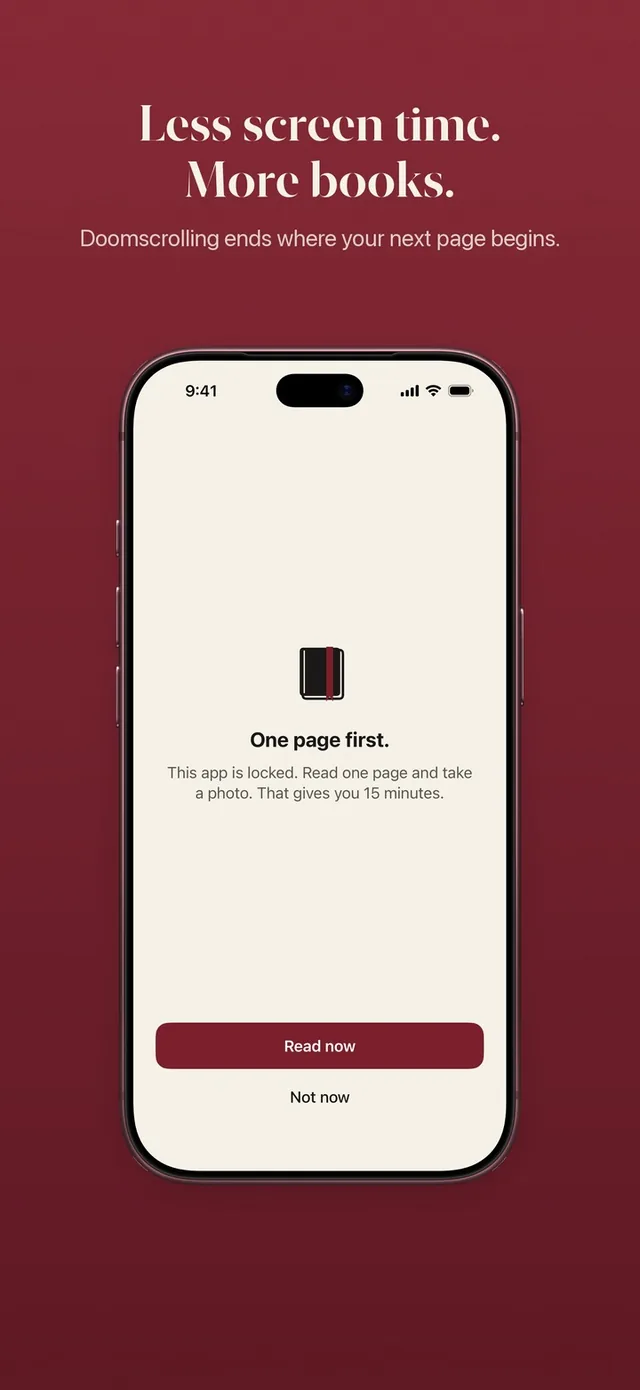
Your reading rule sets the trade, for example one page for 15 minutes or two pages for 10. The minutes only run while you use the locked apps. For a detox week, a stricter rule than usual works well: more pages, fewer minutes.
The 7-day plan
Here is the full plan at a glance. Each day adds one change, and every change stays for the rest of the week.
| Day | Phone change | Reading | Small win |
|---|---|---|---|
| 1 | Choose your apps and lock them | 5 pages | You set up the gate |
| 2 | Phone charges outside the bedroom | 5 pages in bed | A screen-free last half hour |
| 3 | No phone for the first 30 minutes of the day | 5 pages with breakfast | A calm start |
| 4 | Turn off notifications for every non-person app | 10 pages | Fewer pulls all day |
| 5 | One meal or walk with no phone | 10 pages | A real break |
| 6 | An offline hour with a long reading session | 30 to 60 minutes | A chapter in one go |
| 7 | Review and choose what to keep | Your new daily goal | A plan for next week |
Your feed apps open only after pages all week. Everything else on your phone works as usual.
Day by day
Each day of the challenge has one focus and takes only a few minutes to set up.
Day 1: Build the gate. Write down the apps that cost you the most time and lock them. Put your book where you usually scroll: on the sofa, on your pillow, in your bag. Read five pages before you go to sleep.
Day 2: Move the charger. Charge your phone in the kitchen or the hallway tonight. Use a cheap alarm clock if you need one. The last half hour of the day belongs to your book. If evenings are your hardest time, read our guide on how to stop doomscrolling before bed.
Day 3: Protect the morning. For the first 30 minutes after you wake up, don't open your phone. Read five pages with your coffee instead. The morning sets the tone, and a feed first thing tends to pull the rest of the day along with it.
Day 4: Cut the pings. Open your notification settings and turn off everything that isn't a real person or something you truly need. Shopping, news and social notifications go. Then raise your reading to ten pages.
Day 5: One real break. Take one meal or one walk with no phone at all. Notice how it feels to be bored for a few minutes. Boredom is often where the urge to scroll starts, and it passes faster than you think.
Day 6: Go long. Plan an offline hour, ideally on a weekend morning. Read for 30 to 60 minutes in one sitting. Finishing a full chapter or two without looking up is the clearest sign your attention is coming back.
Day 7: Decide what stays. Look back at the week. Which changes felt easy? Which ones did you miss? Pick at least two to keep, and set a daily reading goal you can reach on a busy day.
Make the detox fair, not punishing
A detox you can't live with ends early, so leave room for real life. If you need a locked app for something urgent, don't count it as failure.
ReadFirst has a few features that help here:
- The bank. If you read more than your rule asks, the extra minutes go into a bank for later that day, up to 5 hours. A long reading session in the morning can cover your evening. The bank empties at midnight.
- Skips. By default you get one skip a week for real exceptions. A skip makes you wait 10 seconds and opens your apps for at most 15 minutes.
- Lock now. When you're done with your apps, lock them early. Unused minutes stay for later today.
- A daily limit. If you want a cap on top of the pages, you can set a daily limit for time in your locked apps.
These are there so the gate stays fair. The pages stay the price.
What to do when you slip
Slipping during a digital detox is normal, and one slip doesn't cancel the week. If you scroll for an hour on day four, you haven't lost anything except an hour. Go back to the plan the same day.
A few things help after a slip:
- Ask what triggered it: boredom, stress, a notification, being tired.
- Change one small thing that would have made it harder, such as a stricter rule or the charger in another room.
- Read your pages anyway, even just two. The habit you're building is the reading, not perfection.
After day 7: keep what worked
The goal of a 7-day digital detox is not to go back to normal on day eight, but to keep the two or three changes that made the biggest difference. For most people that's the charger outside the bedroom, fewer notifications and some kind of gate in front of the feed.
Keep reading every day, too. A small daily page goal and a reading streak make it easy to see that the habit is still there. If you want to see how a week of pages adds up, ReadFirst shows your reading by week, month and year, with share cards you can save.
Your week starts tonight
A digital detox for readers is not about hating your phone. It's about deciding what comes first. Seven small changes and a few pages a day can give you calmer evenings, a book that actually moves and the feeling of being someone who reads. If you want the feed to wait for your book, ReadFirst keeps your chosen apps locked until you've read your pages.
Frequently asked questions
What is a digital detox challenge?
A digital detox challenge is a set period, often a week, where you deliberately change how you use your phone and other screens. This version adds one small phone rule each day and replaces scrolling with reading a printed book.
Do I have to stop using my phone completely?
No. In this 7-day plan you keep calls, messages, maps and work apps. Only the apps that eat your time are locked, and they open after you read a few pages.
How do I make apps open only after reading?
Apple's built-in Screen Time can limit apps, but a limit can be skipped with a tap. ReadFirst locks the apps you choose and opens them after you read pages of a printed book and take a live photo of the last page.
What if I need a locked app urgently?
ReadFirst gives you one skip a week by default for real exceptions. It waits 10 seconds and opens your apps for up to 15 minutes, never more than your rule.
What should I read during a digital detox?
Pick a printed book you want to read tonight, ideally with short chapters and a strong plot. An easy, enjoyable book makes it much more likely you'll pick it up instead of your phone.